nginx配置基础
序言
Nginx是lgor Sysoev为俄罗斯访问量第二的rambler.ru站点设计开发的 。从2004年发布至今,凭借开源的力量,已经接近成熟与完善。Nginx功能丰富,可作为HTTP服务器,也可作为反向代理服务器,邮件服务器。支持FastCGI、SSL、Virtual Host、URL Rewrite、Gzip等功能。并且支持很多第三方的模块扩展。Nginx的稳定性、功能集、示例配置文件和地系统资源的消耗让他后来者居上,在全球活跃的网站中有12.18%的使用比率,大约为2220万个网站。
Nginx常用功能
反向代理
Http代理,反向代理:作为web服务器最常见的功能之一,尤其是反向代理。
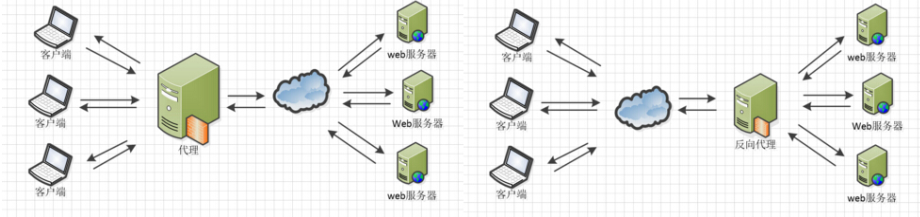
Nginx在做正向代理时,提供性能稳定,并且能够提供配置灵活的转发功能。Nginx可以根据不同的正则匹配,采取不同的转发策略,比如图片文件结尾的走文件服务器,动态页面走web服务器,只要正则写的没问题,又有相对应的服务器解决方案,就可以随心所欲的玩,并且nginx对返回结果进行错误页跳转,异常判断,如果被分发的服务器存在异常,可以将请求重新转发给另外一台服务器,然后自动去除异常服务器。
负载均衡
Nginx提供的负载均衡策略有两种:内置策略和扩展策略。内置策略为轮询,加权轮询、 ip hash。扩展策略就天马行空只有想不到没有它做不到的。
如下三种负载均衡算法的实现

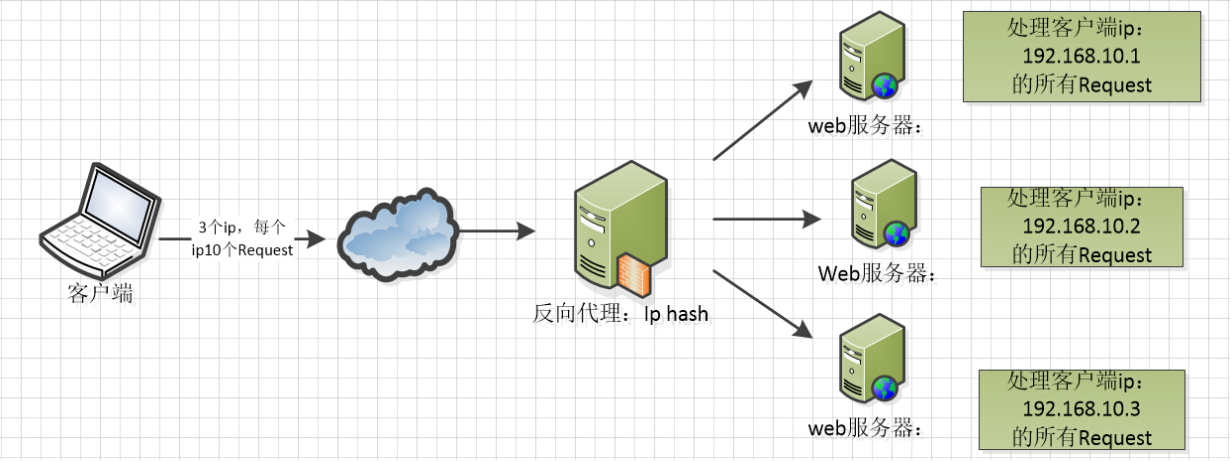
ip hash算法,对客户端请求的ip进行hash操作,然后根据hasn结果将同一个客户端ip请求分发给同一台服务器进行处理,可以解决session不共享的问题。
web缓存
Nginx可以对不同的文件做不同的缓存处理,配置灵活,并且支持FastCGI_Cache,主要用于对FastCGI的动态程序进行缓存,配合这第三方的ngx_cache_purge,对指定的URL缓存内容可以的进行增删管理
Nginx相关地址
源码:https://trac.nginx.org/nginx/browser
Nginx配置文件结构
下载Nginx,打开conf文件夹的nginx.conf文件,Nginx服务器的最基础配置,默认的配置存放在这里,在nginx.conf的注释符号为#,nginx默认配置如下:
#user  nobody;
worker_processes  1;

#error_log  logs/error.log;
#error_log  logs/error.log  notice;
#error_log  logs/error.log  info;

#pid        logs/nginx.pid;


events {
    worker_connections  1024;
}


http {
    include       mime.types;
    default_type  application/octet-stream;

    #log_format  main  '$remote_addr - $remote_user [$time_local] "$request" '
    #                  '$status $body_bytes_sent "$http_referer" '
    #                  '"$http_user_agent" "$http_x_forwarded_for"';

    #access_log  logs/access.log  main;

    sendfile        on;
    #tcp_nopush     on;

    #keepalive_timeout  0;
    keepalive_timeout  65;

    #gzip  on;

    server {
        listen       80;
        server_name  localhost;

        #charset koi8-r;

        #access_log  logs/host.access.log  main;

        location / {
            root   html;
            index  index.html index.htm;
        }

        #error_page  404              /404.html;

        # redirect server error pages to the static page /50x.html
        #
        error_page   500 502 503 504  /50x.html;
        location = /50x.html {
            root   html;
        }

        # proxy the PHP scripts to Apache listening on 127.0.0.1:80
        #
        #location ~ \.php$ {
        #    proxy_pass   http://127.0.0.1;
        #}

        # pass the PHP scripts to FastCGI server listening on 127.0.0.1:9000
        #
        #location ~ \.php$ {
        #    root           html;
        #    fastcgi_pass   127.0.0.1:9000;
        #    fastcgi_index  index.php;
        #    fastcgi_param  SCRIPT_FILENAME  /scripts$fastcgi_script_name;
        #    include        fastcgi_params;
        #}

        # deny access to .htaccess files, if Apache's document root
        # concurs with nginx's one
        #
        #location ~ /\.ht {
        #    deny  all;
        #}
    }


    # another virtual host using mix of IP-, name-, and port-based configuration
    #
    #server {
    #    listen       8000;
    #    listen       somename:8080;
    #    server_name  somename  alias  another.alias;

    #    location / {
    #        root   html;
    #        index  index.html index.htm;
    #    }
    #}


    # HTTPS server
    #
    #server {
    #    listen       443 ssl;
    #    server_name  localhost;

    #    ssl_certificate      cert.pem;
    #    ssl_certificate_key  cert.key;

    #    ssl_session_cache    shared:SSL:1m;
    #    ssl_session_timeout  5m;

    #    ssl_ciphers  HIGH:!aNULL:!MD5;
    #    ssl_prefer_server_ciphers  on;

    #    location / {
    #        root   html;
    #        index  index.html index.htm;
    #    }
    #}

}
nginx文件结构
# 全局块

#events块
events{

}

#http块
http{
    #server块
    server{
        #server全局块
        # location块
        location[PATTERN]
        {

        }
        location[PATTERN]
        {

        }
    }
    server
    {

    }

    #http全局块
}
全局块: 配置影响nginx全局的指令。一般运行nginx服务器的用户组,nginx进程pid存放路径,日志存放路径,配置文件引入,允许生成worker process数等。
events块:配置影响nginx服务器或与用户的网络连接,有每个进程的最大连接数,选取那种事件驱动模型处理连接请求,是否允许同时 接受多个网络连接,开启多个网络连接序列化等。
http块: 可以嵌套多个server,配置代理、缓存、日志定义等绝大多数功能和第三方模块的配安置如文件引入,mine-type定义,日志自定义,是否使用sendfile传输文件,连续超时时间,单链接请求数等。
server块:配置虚拟机的相关参数,一个http中可以有多个server。
location块:配置请求的路由,以及各种页面的处理情况。
配置案例
########## 每个指令必须有封号##########
#配置用户或者组,默认为nobody nobody
#user administrator administrators;
#允许生成的进程数默认为1
#work_processes 2;
#指定nginx进程运行文件存放地址
# pid /nginx/pid/nginx.pid;
#指定日志路径,级别。这个设置可以放入全局块mhttp块,server块,块别:debug|info|notice|warn|error|crit|alert|emerg
error_log log/error.log debug;
events{
    accept_mutex on;#设置网络连接序列化,防止惊群现象发生,默认为on
    multi_accept on;#设置一个进程是否同时接受多个网络连接,默认为off
    #use epoll;#事件驱动模型select|poll|kqueue|epoll|resig|/dev/poll|eventport
    worker_connections 1024;#最大连接数,默认为512
}
http{
    inculde  mime.types;#文件扩展名与文件类型映射表
    default_type  application/octet-stream;#默认文件类型,默认为text/plain
    #access_log off;#取消服务日志
    log_format myFormat '$remote_addr-$remote_user [$time_local] $request $status $body_bytes_sent $http_referer $http_user_agent $http_x_forwarded_for';
    #自定义
    access_log log/access.log myFormat;#combined为日志格式的默认值
    sendfile on;#允许sendfile方式传输文件,默认为off,可以在http块,server块,location块
    sendfile_max_chunk 100k; #每个进程每次调用传输数量不能大于设定的值,默认为0,即不设上限
    keepalive_timeout 65;#连接超时时间,默认为75s,可以再http、server、location块设置

    upstream mysvr{
        server 127.0.0.1:7878;
        server 192.168.10.131:3333 backup;#热备
    }

    error_page 404 https://www.baidu.caom;#错误页

    server{
        keepalive_requests 120;#单连接请求上限次数。
        listen   4545;#监听端口
        server_name 127.0.0.1;#监听地址
         #请求的url过滤,正则表达式,~为区分大小写,~*为不区分大小写
        location ~*^.+${
           #root path;#根目录
           #index vv.txt;#设置默认页
           proxy_pass http://myserver;#请求转向myServer 定义服务器列表
           deny 127.0.0.1;#拒绝的ip
           allow 172.18.5.54;#允许的ip
        }
    }
}
如上nginx的基本配置,需要注意一下几点:
- 配置项
- $remote_addr与$http_x_forwaded_for用以记录客户端的ip地址
- $remote_user:用来记录客户端用户名称;
- $time_local:用来记录访问时间与时区;
- $request:用来记录请求的url与http协议;
- $status:用来记录请求状态,成功是200;
- $body_bytes_send:记录发送给客户端文件主体内容大小;
- $http_referer:用来记录从那个页面链接访问过来的
- $http_user_agent:记录客户端浏览器的相关信息;
- 惊群现象 一个网络连接到来,多个睡眠的进程被同时叫醒,但只有一个进程能获得链接,这样会影响系统性能。
- 每个指令必须由封号结束。
Nginx代理服务的配置说明
http模块中可以进行如下配置,当遇到状态码为404时,可以吧404页面导向百度
error_page 404 https://www.baidu.com;#错误页
但是如上配置并不起作用,需要配合下面的配置一起使用
proxy_intercept_errors on;#如果被代理服务器返回的装代码为400,设置的error_page配置起作用,默认为off
如果代理只允许只收get、post请求方法的一种
proxy_method get; #支持客户端的请求方法。post/get
设置支持的http协议版本
proxy_http_version 1.0;#nginx服务器提供代理服务的http协议版本1.0,1.1,默认设置为1.0版本
如果配置的nginx服务器给2台web服务器做代理,负载均衡算法采用轮询,那么当一台机器的web程序iis关闭,也就是说web不能访问,那么nginx服务器分发请求还是会给这台不能访问的web服务器,如果这里的响应连接时间过长,就会导致客户端的页面一直在等待响应,对用户来说体验就大大折扣,效果如下:
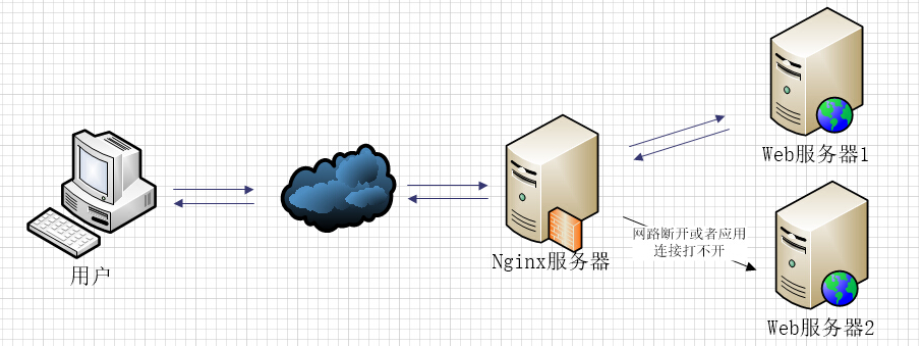
如图所示,负载均衡中web2发生这样的情况,nginx首先回去web1请求,但是nginx在配置不当的情况下会继续分发请求到web2,然后等待web2响应,直到响应超时,才会把请求重新分发给web1,这里响应时间越长用户等待的时间越长。
如下是配置解决方案之一:
proxy_connect_timeout 1;#nginx服务器与被代理的服务器建立连接的超时时间,默认60s
proxy_read_timeout 1;#nginx服务器想被代理服务器组发出read请求后,等待响应的超时时间默认为60s
proxy_send_timeout 1;#nginx服务器想被代理服务器组发出write请求后,等待响应的超时时间默认为60s
proxy_ignore_client_abort on;#客户端断网时nginx,nginx服务器是否终止对被代理服务器的请求,默认为off。
如果使用upstream指令配置了一组服务器作为被代理服务器,服务器中的访问算法遵循配置的负载均衡规则,同时可以使用该指令配置在发生哪些异常情况下,将请求顺次交给下一组服务器处理。
#反向代理upstream中设置的服务器组,出现故障时,被代理服务器返回的状态值。 error|timeout|invalid_header|http_500|http_502|http_503|http_504|http_404|off
proxy_next_upstream timeout;
- error:建立连接或向被代理的服务器发送请求或读取响应信息时服务器发生错误。
- timeout:建立连接,想被代理服务器发送请求或读取响应信息时服务器发生超时。
- invalid_header:被代理服务器返回的响应头异常。
- off:无法将请求分发给被代理的服务器。
- http_400....:被代理的服务器返回的状态码为400、500、502等
如果想通过http获取客户的真实ip而不是获取代理服务器的ip地址,那么要加入如下配置:
#只要用户在浏览器中访问的域名绑定了VIp,VIP下面有RS则就用$host;host是访问URL中的域名和端口www.taobao.co,:80
peoxy_set_header Host $hoist;
#把源IP[$remote_addr,建立HTTP连接header里面的信息]赋值给x-Real-IP;这样在代码中$X-Real-IP来获取源IP
proxy_set_header X-Real-IP $remote_addr;
#在nginx作为代理服务器时,设置的IP列表,会经过机器ip,代理服务器ip都记录下来,用“,”隔开;代码中用echo $x-forded-for|awk -F,‘{print $1}’ 作为源ip
proxy_set_header X-Forwarded-For $proxy_add_x_dorwarded_for;
关于F-Forwarded-For与X-Real_IP配置参考https://imququ.com/post/x-forwarded-for-header-in-http.html
如下是关于代理配置的配置文件部分
inculde  mime.types;#文件扩展名与文件类型映射表
default_type  application/octet-stream;#默认文件类型,默认为text/plain
#access_log off;#取消服务日志
log_format myFormat '$remote_addr-$remote_user [$time_local] $request $status $body_bytes_sent $http_referer $http_user_agent $http_x_forwarded_for';
#自定义
access_log log/access.log myFormat;#combined为日志格式的默认值
sendfile on;#允许sendfile方式传输文件,默认为off,可以在http块,server块,location块
sendfile_max_chunk 100k; #每个进程每次调用传输数量不能大于设定的值,默认为0,即不设上限
keepalive_timeout 65;#连接超时时间,默认为75s,可以再http、server、location块设置

proxy_connect_timeout 1;#nginx服务器与被代理的服务器建立连接的超时时间,默认60s
proxy_read_timeout 1;#nginx服务器想被代理服务器组发出read请求后,等待响应的超时时间默认为60s
proxy_send_timeout 1;#nginx服务器想被代理服务器组发出write请求后,等待响应的超时时间默认为60s

proxy_http_version 1.0;#nginx服务器提供代理服务的http协议版本1.0,1.1,默认设置为1.0版本

proxy_method get; #支持客户端的请求方法。post/get

proxy_ignore_client_abort on;#客户端断网时nginx,nginx服务器是否终止对被代理服务器的请求,默认为off。

proxy_ignore_headers "Expires" "Set-Cookie";#nginx服务器不处理设置的http响应头中的头域,这里空格隔开可以设置多个

proxy_intercept_error on;#如果被代理服务器返回的状态码为400或者大于400设置的error_page配置起作用,默认为off

proxy_header_hash_max_size 1024;#存放http报文头哈希表容量上限,默认为512个字符。

proxy_headers_hash_bucket_size 128;#nginx服务器中申请存放http报头头的哈希表容量大小,默认为64个字符。

#反向代理upstream中设置的服务器组,出现故障时,被代理服务器返回的状态值。 error|timeout|invalid_header|http_500|http_502|http_503|http_504|http_404|off
proxy_next_upstream timeout;

#proxy_ssl_session_reuse on; #默认为on,如果在错误日志中发现"SSL3_GET_FINSHED:digest check failed"的情况时,可以将该指令设置为off。
Nginx负载均衡详解
Nginx中upstream的配置,如果这个配置是写了一组被代理的服务器地址,然后配置负载均衡的算法。这里被代理服务器地址中有如下粮食总写法。
upstream mysvr{
    server 192.168.10.121:3333;
    server 192.168.10.122:3333;
}

server{
    ....
    location ~*^.+${
        proxy_pass http://mysvr;#请求转向mysvr定义的服务器列表
    }
}

upstream mysvr{
    server http://192.168.10.121:3333;
    server http://192.168.10.122:3333;
}

server{
    ....
    location ~*^.+${
        proxy_pass http://mysvr;#请求转向mysvr定义的服务器列表
    }
}
负载均衡常用配置
- 热备:如果有两台服务器,当一台服务器发生事故时才启用第二台服务器给提供服务,服务器处理请求顺序:A服务器挂了才启用B服务器
upstream mysvr{
    server 127.0.0.1:7878;
    server 192.168.10.121:3333 backup; #热备
}
- 轮询:nginx默认就是轮询其权重都默认为1,服务器处理请求的顺序:ABABAB...
upstream mysvr{
    server 127.0.0.1:7878;
    server 192.168.10.121:3333;
}
- 加权轮询:根据配置的权重的大小而分发给不同服务器不同数量的请求,如果不配置,默认为热备,如下服务器的请求顺序为ABBABBABB...
upstream mysvr{
    server 127.0.0.1:7878 weight=1;
    server 192.168.10.121:3333 weight=2;
}
- is_hash:nginx会让相同的客户端ip请求相同的服务器
upstream mysvr{
    server 127.0.0.1:7878;
    server 192.168.10.121:3333;
    ip_hash;
}
关于nginx负载均衡配置的几个状态参数:
- down,表示当前的server暂时不参与负载均衡
- backup,预留的备份机器,当其他所有非backup机器出现故障或者忙的时候迷彩灰请求backup机器,因此这台机器的压力最轻
- max_fails,允许请求失败的次数,默认为1,当超过最大次数时,返回proxy_next_upstream模块定义的错误
- fail_timeout,在经历了max_fails次失败后,暂停服务的时间。max_fails可以和fail_timeout一起使用
upstream mysvr{
    server 127.0.0.1:7878 weight=2 max_fails=2 fail_timeout=2;
    server 192.168.10.121:3333 weight=1 max_fails=2 fail_timeout=1;
    ip_hash;
}