typescript基础入门
为什么要学 TypeScript
Typescript 在推出之初即受追捧又受质疑,在社区和各种论坛中总有一些这样的声音:
- 静态语言丧失 JavaScript 的灵活性
- 静态语言不是银弹,大型项目依然可以用 JavaScript 编写
- Typescript 必定赴 coffeescript 的后尘,会被标准取代
JavaScript 的超集
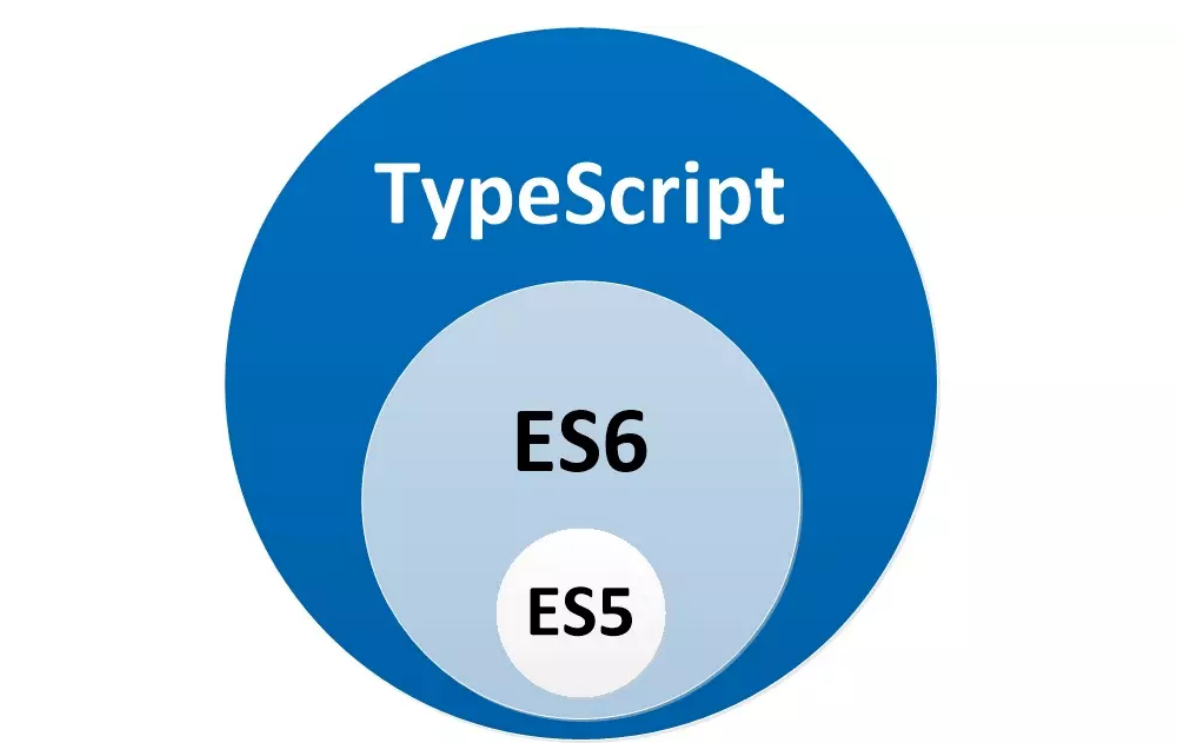
- 在 TypeScript 可以使⽤⼀些尚在提案阶段的语法特性,可以有控制访问符,⽽最主要的区别就是 TypeScript 是⼀⻔静态语⾔。
- 这也是为什么 「TypeScript 必定赴 coffeescript 后尘,会被标准取代」 这个论断⼏乎不可能成⽴ 的原因之⼀,coffeescript 本质上是 JavaScript 的语法糖化,ES2015 参考了⼤量 coffeescript 的 内容进⾏了标准化,因此 coffeescript 的优势也就不存在了,被淘汰在所难免。
- 给⼀⻔语⾔加语法糖是相对容易推进到标准的事情,⽽直接把⼀⻔语⾔从动态改为静态,还要兼容 数以亿计的⽼旧⽹站,这个在可预⻅的时间内⼏乎不可能发⽣,TypeScript 与 coffeescript 虽然都 到底为什么要学习 TypeScript? •••JavaScript 的超集 ••• 是 「Compile to JavaScript Language」,但是 TypeScript 的静态性是它⽴于不败之地的基础
静态类型
简单来说,⼀⻔语⾔在编译时报错,那么是静态语⾔,如果在运⾏时报错,那么是动态语⾔。 JavaScript 项⽬中最常⻅的⼗⼤错误。
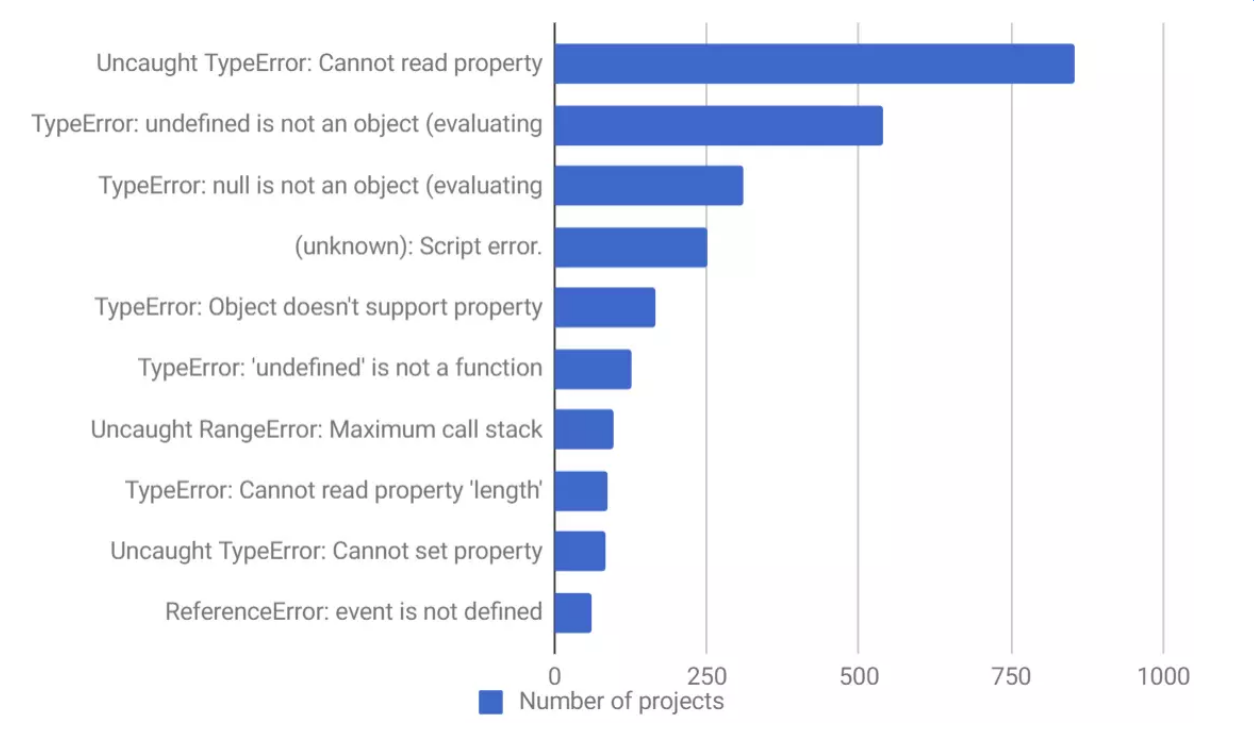
很多项⽬,尤其是中⼤型项⽬,我们是需要团队多⼈协作的,那么如何保证协作呢?这个时候可能需 要⼤量的⽂档和注释,显式类型就是最好的注释,⽽通过 TypeScript 提供的类型提⽰功能我们可以⾮ 常舒服地调⽤同伴的代码,由于 TypeScript 的存在我们可以节省⼤量沟通成本、代码阅读成本等等。
严谨不失灵活
很多⼈以为⽤了 TypeScript 之后就会丧失 JavaScript 的灵活性,其实并不是。 ⾸先,我们得承认 JavaScript 的灵活性对于中⼤型项⽬弊远远⼤于利,其次,TypeScript 由于兼容 JavaScript 所以其灵活度可以媲美 JavaScript,⽐如可以把任何想灵活的地⽅将类型定义为 any 即 可,把 TypeScript 变为 AnyScript 就能保持它的灵活度,毕竟 TypeScript 对类型的检查严格程度是可 以通过 tsconfig.json 来配置的。
即使在开启 strict 状态下的 TypeScript 依然是很灵活的,因为为了兼容 JavaScript,TypeScript 采⽤了 Structural Type System。
因此,TypeScript 并不是类型定义本⾝,⽽是类型定义的形状(Shape),看个例⼦:
 class Foo {
     method(input: string): number { ... }
 }
 class Bar {
     method(input: string): number { ... }
 }
 const foo: Bar = new Foo(); // Okay.const bar: Bar = new Foo(); // Okay.
以上代码是不会报错的,因为他们的「形状」是⼀样的,⽽类似的代码在 Java 或者 C# 中是会报错 的。
这就是 TypeScript 类型系统设计之初就考虑到了 JavaScript 灵活性,专⻔选择了 Structural Type System(结构类型系统)。
Typescript缺点
- 与实际框架结合会有很多坑
- 配置学习成本⾼
- TypeScript 的类型系统其实⽐较复杂
基础类型
- 布尔类型:
boolean - 数字类型:
number - 字符串类型:
string - 空值:
void - Null 和 Undefined:
null和undefined - Symbol 类型:
symbol - BigInt ⼤数整数类型:
bigint
这⾥需要提⽰⼀下,很多 TypeScript 的原始类型⽐如 boolean、number、string等等,在 JavaScript中都有类似的关键字 Boolean、Number、String,后者是 JavaScript 的构造函数,⽐如⽤ Number ⽤于数字类型转化或者构造 Number 对象⽤的,⽽ TypeScript 中的 number 类型仅 仅是表⽰类型,两者完全不同。
其他:
any类型是多⼈协作项⽬的⼤忌,很可能把Typescript变成AnyScript,通常在不得已的情况下, 不应该⾸先考虑使⽤此类型。unknown是 TypeScript 3.0 引⼊了新类型,是 any 类型对应的安全类型。unknown与any的不同之处,虽然它们都可以是任何类型,但是当unknown类型被确定是某个类 型之前,它不能被进⾏任何操作⽐如实例化、getter、函数执⾏等等。never类型表⽰的是那些永不存在的值的类型,never 类型是任何类型的⼦类型,也可以赋值给任 何类型;然⽽,没有类型是 never 的⼦类型或可以赋值给 never 类型(除了never本⾝之外)。
//抛出异常的函数永远不会有返回值
function error(message:string):never{
    throw new Error(message)
}

//空数组,而且永远是空的
const empty:never[] = [];
数组
有两种类型定义的方式,一种是使用泛型:
const list:Array<number> = [1,2,3]
另一种使用更广泛就是在元素类型后面接上[]:
const list:number[] = [1,2,3]
元组(Tuple)
元组类型与数组类型⾮常相似,表⽰⼀个已知元素数量和类型的数组,各元素的类型不必相同。
let x:[string,number];
x = ['hello',10,false];//Error
x=['hello'];//Error
元组⾮常严格,即使类型的顺序不⼀样也会报错。
let x: [string, number];
x = ['hello', 10]; // OK
x = [10, 'hello']; // Error
我们可以把元组看成严格版的数组,⽐如 [string, number] 我们可以看成是:
interface Tuple extends Array<string | number>{
    0:string;
    1:number;
    length:2;//字面量类型 只能赋值为2
}
元祖越界问题: 可以设置push等给数组增加新元素的方法,可以给元祖添加新元素,但是读取不到越界的元素
object 表⽰⾮原始类型,也就是除 number,string,boolean,symbol,null 或 undefined 之外 的类型。
// 这是下⼀节会提到的枚举类型
enum Direction {
  Center = 1
}
let value: object
value = Direction
value = [1]
value = [1, 'hello']
value = {}
普通对象、枚举、数组、元组通通都是 object 类型。
深入理解枚举类型
枚举类型是很多语⾔都拥有的类型,它⽤于声明⼀组命名的常数,当⼀个变量有⼏种可能的取值时,可以 将它定义为枚举类型。
数字枚举
当我们声明⼀个枚举类型是,虽然没有给它们赋值,但是它们的值其实是默认的数字类型,⽽且默认从0开 始依次累加:
enum Direction {
    Up,
    Down,
    Left,
    Right
}

console.log(Direction.Up === 0)//true
console.log(Direction.Down === 1)//true
console.log(Direction.Left === 2)//true
console.log(Direction.Right === 3)//true
因此当我们把第⼀个值赋值后,后⾯也会根据第⼀个值进⾏累加:
enum Direction {
    Up=10,
    Down,
    Left,
    Right
}

console.log(Direction.Up, Direction.Down, Direction.Left, Direction.Right); //10 11 12 13
字符串枚举
enum Direction {
    Up='Up',
    Down='Down',
    Left='Left',
    Right='Right'
}

console.log(Direction['Right'], Direction.Up); // Right Up
异构枚举
enum BooleanLikeHeterogeneousEnum {
    No=0;
    Yes='YES'
}
通常情况下我们很少会这样使⽤枚举,但是从技术的⻆度来说,它是可⾏的。
反向映射
可以通过枚举名字获取枚举值,这当然看起来没问题,那么能不能通过枚举值获取枚举名字呢?
enum Direction {
    Up,
    Down,
    Left,
    Right
}
console.log(Direction[0])//'Up'
枚举本质
以上⾯的 Direction 枚举类型为例,不妨看⼀下枚举类型被编译为 JavaScript 后是什么样⼦:
var Direction;
 (function (Direction) {
      Direction[Direction["Up"] = 10] = "Up";
      Direction[Direction["Down"] = 11] = "Down";
      Direction[Direction["Left"] = 12] = "Left";
      Direction[Direction["Right"] = 13] = "Right";
 })(Direction || (Direction = {}));
常量枚举
enum Tristate {
  False,
  True,
  Unknown
}

const lie = Tristate.False;
编译后的结果为
let lie = 0;
可以提升性能
联合枚举与枚举成员的类型
当所有枚举成员都拥有字⾯量枚举值时,它就带有了⼀种特殊的语义,即枚举成员成为了类型。
 enum Direction {
      Up,
      Down,
      Left,
      Right
      }
onst a = 0
console.log(a === Direction.Up) // true
把成员当做值使⽤,看来是没问题的,因为成员值本⾝就是0,那么再加⼏⾏代码:
type c = 0;
delare let b = c;
b = 1//不能将1分配给类型0
b = Direction.Up//OK
联合枚举类型
enum Direction {
    Up,
    Down,
    Left,
    Right
}
declare let a: Direction
enum Animal {
    Dog,
    Cat
}
a = Direction.Up // ok
a = Animal.Dog // 不能将类型“Animal.Dog”分配给类型“Direction”
把 a 声明为 Direction 类型,可以看成声明了⼀个联合类型 Direction.Up | Direction.Down | Direction.Left | Direction.Right ,只有这四个类型其中的成员
枚举合并
enum Direction {
  Up = 'Up',
  Down = 'Down',
  Left = 'Left',
  Right = 'Right'
}

enum Direction {
  Center = 1
}
为枚举添加静态方法
enum Month {
  January,
  February,
  March,
  April,
  May,
  June,
  July,
  August,
  September,
  October,
  November,
  December,
}
namespace Month {
  export function isSummer(month: Month) {
    switch (month) {
      case Month.June:
      case Month.July:
      case Month.August:
        return true;
      default:
        return false
    }
  }
}
console.log(Month.isSummer(Month.January)) // false
console.log(Month.isSummer(Month.July))
接口(interface)
TypeScript 的核⼼原则之⼀是对值所具有的结构进⾏类型检查,它有时被称做“鸭式辨型法”或“结构 性⼦类型化”。
在TypeScript⾥,接⼝的作⽤就是为这些类型命名和为你的代码或第三⽅代码定义契约。
接口的使用
可选属性、只读属性
interface User{
    name:stirng;
    age?:number;
    readonly isMale: boolean;
}
函数类型
如果这个 user 含有⼀个函数怎么办?
interface User{
    name:stirng;
    age?:number;
    readonly isMale: boolean;
    say:(words:string) => string;
}
继承接口
interface VIPUser extends User {
    broadcast: () => void
    }
interface VIPUser extends User, SupperUser {
    broadcast: () => void
}
类
传统的⾯向对象语⾔基本都是基于类的,JavaScript 基于原型的⽅式让开发者多了很多理解成本,在 ES6 之后,JavaScript 拥有了 class 关键字,虽然本质依然是构造函数,但是开发者已经可以⽐较舒服地使⽤ class了。 但是 JavaScript 的 class 依然有⼀些特性还没有加⼊,⽐如修饰符和抽象类等。 之于⼀些继承、静态属性这些在 JavaScript 本来就存在的特性,就不过多讨论了。
抽象类
抽象类做为其它派⽣类的基类使⽤,它们⼀般不会直接被实例化,不同于接⼝,抽象类可以包含成员的实 现细节。
abstract 关键字是⽤于定义抽象类和在抽象类内部定义抽象⽅法。
⽐如创建⼀个 Animal 抽象类:
abstract class Animal {
    abstract makeSound(): void;
    move(): void {
        console.log('roaming the earch...');
    }
}
实例化此抽象类会报错
不能直接实例化抽象类,通常需要我们创建⼦类继承基类,然后可以实例化⼦类。
class Cat extends Animal {
    makeSound() {
        console.log('miao miao')
    }
}
const cat = new Cat()
cat.makeSound() // miao miao
cat.move() // roaming the earch...
访问限定符
public
在 TypeScript 的类中,成员都默认为 public, 被此限定符修饰的成员是可以被外部访问。
private
当成员被设置为 private 之后, 被此限定符修饰的成员是只可以被类的内部访问。
protected
当成员被设置为 protected 之后, 被此限定符修饰的成员是只可以被类的内部以及类的⼦类访问。
class Car {
  protected run() {
    console.log('启动...')
  }
}

class GTR extends Car {
  init() {
    this.run()
  }
}

const car = new Car()
const gtr = new GTR()

// car.run() // [ts] 属性“run”受保护,只能在类“Car”及其子类中访问。
// gtr.init() // 启动...
// gtr.run() // [ts] 属性“run”受保护,只能在类“Car”及其子类中访问
class可以作为接口
上⼀节讲到接⼝(interface),实际上类(class)也可以作为接⼝。 ⽽把 class 作为 interface 使⽤,在 React ⼯程中是很常⽤的。 由于组件需要传⼊ props 的类型 Props ,同时有需要设置默认 props 即 defaultProps 。 这个时候 class 作为接⼝的优势就体现出来了。 我们先声明⼀个类,这个类包含组件 props 所需的类型和初始值:
// props的类型
export default class Props {
    public children: Array<React.ReactElement<any>> | React.ReactElement<any> | never[] = []
    public speed: number = 500
    public height: number = 160
    public animation: string = 'easeInOutQuad'
    public isAuto: boolean = true
    public autoPlayInterval: number = 4500
    public afterChange: () => {}
    public beforeChange: () => {}
    public selesctedColor: string
    public showDots: boolean = true
}
当需要传⼊ props 类型的时候直接将 Props 作为接⼝传⼊,此时 Props 的作⽤就是接⼝, ⽽当需要我们设置 defaultProps 初始值的时候,我们只需要:
public static defaultProps = new Props()
Props 的实例就是 defaultProps 的初始值,这就是 class 作为接⼝的实际应⽤,⽤⼀个 class 起到了接⼝和设置初始值两个作⽤,⽅便统⼀管理,减少了代码量。
函数(Function)
函数是 JavaScript 应⽤程序的基础,它帮助你实现抽象层、模拟类、信息隐藏和模块。 在 TypeScript ⾥,虽然已经⽀持类、命名空间和模块,但函数仍然是主要的定义⾏为的地⽅,TypeScript 为 JavaScript 函数添加了额外的功能,可以更容易地使⽤。
定义函数类型
const add = (a:number,b:number) => a+b;
函数的参数详解
可选参数
⼀个函数的参数可能是不存在的,这就需要我们使⽤可选参数来定义. 只需要在参数后⾯加上 ? 即代表参数可能不存在。
const add = (a: number, b?: number) => a + b;
默认参数
const add = (a: number, b=1) => a + b;
剩余参数
const add = (a: number, ...rest: number[]) => rest.reduce(((a, b) => a + b), a)
重载(Overload)
// 重载
interface Direction {
  top: number
  right: number
  bottom: number
  left: number
}

function assigned(all: number): Direction
function assigned(topAndBottom: number, leftAndRight: number): Direction
function assigned(top: number, right: number, bottom: number, left: number): Direction

// 代码实现函数不可被调用
function assigned(a: number, b?: number, c?: number, d?: any) {
  if (b === undefined && c === undefined && d === undefined) {
    b = c = d = a
  } else if (c === undefined && d === undefined) {
    c = a
    d = b
  }
  return {
    top: a,
    right: b,
    bottom: c,
    left: d
  }
}
// assigned(1)
// assigned(1, 2)
// assigned(1, 2, 3)
// assigned(1, 2, 3, 4)
泛型(generic)
function returnItem<T>(para:T):T{
    return para;
}
多个类型参数
function swap<T, U>(tuple: [T, U]): [U, T] {
    return [tuple[1], tuple[0]];
}
swap([7, 'seven']); // ['seven', 7]
泛型变量
function getArrayLength<T>(arg: Array<T>) {
    console.log(arg.length) // ok
    return arg
}
泛型接⼝
interface ReturnItemFn<K> {
    (para: K): K
}
const returnItem: ReturnItemFn<number> = para => para
泛型类
class Stack<T> {
    private arr: T[] = []
    public push(item: T) {
        this.arr.push(item)
    }
    public pop() {
        this.arr.pop()
    }
}
泛型约束
先看⼀个常⻅的需求,要设计⼀个函数,这个函数接受两个参数,⼀个参数为对象,另⼀个 参数为对象上的属性,我们通过这两个参数返回这个属性的值
function getValue<T extends Object, U extends keyof T>(obj:T, key:U)T[U]{
    return obj[key]
}
let a2 = {
  a: 1,
  b: 2,
  c: 45
}
console.log(getValue(a2, 'a'))
使⽤多重类型进⾏泛型约束
interface FirstInterface {
  doSomething(): number
}

interface SecondInterface {
  doSomethingElse(): string
}
interface ChildInterface extends FirstInterface, SecondInterface {

}
// class Demo<T extends FirstInterface, SecondInterface> {
//   private genericProperty: T
//   constructor(genericProperty: T) {
//     this.genericProperty = genericProperty
//   }
//   useT() {
//     this.genericProperty.doSomething()
//     this.genericProperty.doSomethingElse() // 类型“T”上不存在属性“doSomethingElse”
//   }
// }
class Demo<T extends ChildInterface> {
  private genericProperty: T
  constructor(genericProperty: T) {
    this.genericProperty = genericProperty
  }
  useT() {
    this.genericProperty.doSomething()
    this.genericProperty.doSomethingElse()
  }
}
泛型与new
 function factory<T>(type: {new(): T}): T {
     return new type() // ok
 }
 //new Construct
 this = Object.creat(Construct.prototype)
 return typeof Construct.call(this) ==='object'? Construct.call(this):this
装饰器
⽬前装饰器本质上是⼀个函数, @expression 的形式其实是⼀个语法糖, expression 求值后必须也是 ⼀个函数,它会在运⾏时被调⽤,被装饰的声明信息做为参数传⼊.
类装饰器
function addAge(target: Function) {
  target.prototype.age = 18;
  target.prototype.say = () => { console.log('say') }
}

@addAge
class Person2 {
  name: string;
  age!: number;
  say!: Function
  constructor() {
    this.name = 'xiaomuzhu';
  }
}

let person = new Person2();

console.log(person.age); // 18
person.say()
属性/方法装饰器
// 声明装饰器修饰方法/属性
function method(target: any, propertyKey: string, descriptor: PropertyDescriptor) {
  console.log(target);
  console.log("prop " + propertyKey);
  console.log("desc " + JSON.stringify(descriptor) + "\n\n");
  descriptor.writable = false;
};

class Person {
  name: string;
  constructor() {
    this.name = 'xiaomuzhu';
  }

  @method
  say() {
    return 'instance method';
  }

  @method
  static run() {
    return 'static method';
  }
}

const xmz = new Person();

//修改实例方法say
// xmz.say = function () {
//   return 'edit'
// }

// 打印结果,检查是否成功修改实例方法
console.log(xmz.say());
参数装饰器
function logParameter(target: Object, propertyKey: string, index: number) {
  console.log(target, propertyKey, index);
}

class Person3 {
  greet(@logParameter message: string, @logParameter name: string): void {
    console.log(`${message} ${name}`)
  }
}
const p = new Person3();
p.greet('hello', 'xiaomuzhu');
装饰器工厂
装饰器顺序
Reflect Metadata
import "reflect-metadata";
function inject(serviceIdentifier: Symbol): Function {
  //目标函数、关键字(别名)controller没有别名、参数索引位置
  return (target: Function, targetKey: string, index: number) => {
    //使用元编程的方式将service注入到controller
    if (!targetKey) {
      Reflect.defineMetadata(
        serviceIdentifier,
        container.get(serviceIdentifier),
        target
      );
    }
  };
}

//确认传入类为可new的
function controller<T extends { new (...args: any[]): {} }>(constructor: T) {
  return class Controller extends constructor {
    constructor(...args: any[]) {
      super(args);
      const _params = getParams(constructor);
      let identity: string;
      for (identity of _params) {
        if (hasKey(this, identity)) {
          //   this[identity] = container.get(TYPES[identity]);
          this[identity] = Reflect.getMetadata(TYPES[identity], constructor);
        }
      }
    }
  };
}